> For the complete documentation index, see [llms.txt](https://learn.islash.io/llms.txt). Markdown versions of documentation pages are available by appending `.md` to page URLs; this page is available as [Markdown](https://learn.islash.io/islash-insights/stop-losing-leads-on-facebook-messenger-start-automating-with-purpose.md).
# Stop Losing Leads on Facebook Messenger—Start Automating With Purpose
Are you drowning in Facebook Messenger inquiries? You're not alone.
With over **20 billion messages exchanged monthly** between people and businesses, Messenger is buzzing. And if you're still replying manually, you're missing out—on time, leads, and most importantly… **sales**.
⏱ Every second you delay replying, your potential customer moves on.
But here’s the good news: [iSlash AI](https://islash.io/) **makes Facebook Automation easy, powerful, and purposeful.**
Let’s break it down.
***
## Why Facebook Messenger Is More Than Just DM
Messenger isn’t just a chat app—it’s a **conversion machine** for businesses that know how to use it. Here’s why:
* **979 million active users** on Messenger
* **40 million businesses** use it to connect
* **375,000 users** chat with bots every day
More than just impressive numbers, these stats tell a bigger story:
✅ **Customers want to message brands**: **66% of adults** are more likely to buy from businesses they can message directly.
✅ **Massive engagement:** Messenger boasts an **88% open rate** and **56% CTR**, outperforming email by miles.
✅ **Powerhouse in social commerce**: **27% of global shoppers** turn to Facebook, with a **9.21% conversion rate**.
✅ **Perfect for family brands**: Moms spend **2.3x more time** on Facebook than TikTok.
✅ **Ad reach keeps growing**: Messenger ads now reach **105 million more users**, expanding your visibility like never before.
> 🔑 Bottom line: **Messenger isn’t optional—it’s essential.**
***
### What Native Facebook Auto-Replies Can Do
Facebook Messenger offers a few auto-reply tools like:
* **Welcome Messages**
* **Away Messages**
* **Lead Capture Replies**
These are great for basic coverage—but limited in depth and customization. They *start* the conversation… but don’t carry it through.
> That’s where **iSlash AI** comes in—your full-powered upgrade to Facebook automation.
***
## What You Could Be Doing with iSlash AI
### 1. Respond with relevance, even outside office hours
Why send a generic “We’ll get back to you soon” when you can auto-reply based on what the customer asked?
With **iSlash AI**, you can:
* Set replies based on **specific keywords or intents**
* Customize replies for **working hours vs. off-hours**
* Provide FAQs, promos, or helpful links instantly
***
### 2. Route messages to the right team—automatically
Don’t waste time forwarding messages. Use **iSlash AI’s roster feature** to:
* Automatically assign chats to the right staff or department
* Keep internal notes so teams stay aligned
***
### 3. Get that “Very Responsive” badge—without breaking a sweat
[90% of customers say immediate replies matter](https://www.hubspot.com/hubfs/assets/flywheel%20campaigns/HubSpot%20Annual%20State%20of%20Service%20Report%20-%202022.pdf).
To earn the “[Very responsive to messages](https://www.facebook.com/help/475643069256244/)” badge on Facebook, you need:
* A **90%+ response rate**
* Replies in under **15 minutes**
With iSlash AI, you can:
* Auto-reply **Messenger chats and comments**
* Reduce wait time and improve response consistency
* Boost trust and visibility with the badge on your page
Want to use **comment auto-replies** to boost your reach? Click [here](https://learn.islash.io/islash-insights-2025/engagement-is-everything-to-the-facebook-and-instagrams-algorithm) to learn more.
***
### 4. Never miss a follow-up again
Don’t let leads go cold. Track and follow up based on timing:
* **0–1 days** since last reply: Send your first follow-up
* **1–2 days**: Nudge them again with value
* **2–7 days**: Try a final follow-up with a special offer
Your pipeline stays hot, and no one falls through the cracks.
***
## Boost Click-to-Messenger—and Capture More Leads Instantly
> If they’re already messaging you, don’t make them jump through hoops—turn that moment into a sale.
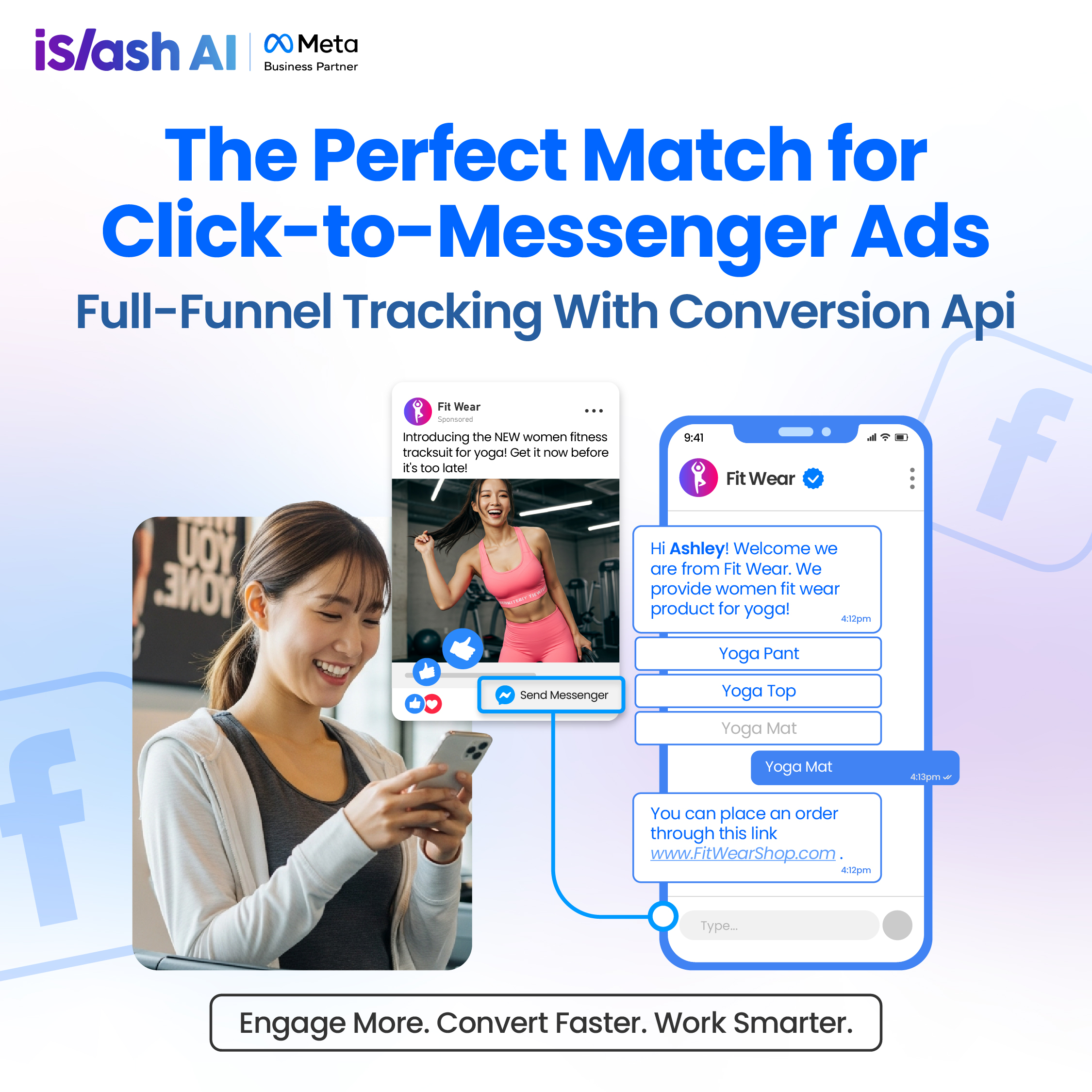
Click-to-Messenger is one of the most powerful tools Meta offers for businesses. With just one button, you can turn any Facebook post or ad into a lead magnet—bringing potential customers straight into your Messenger inbox, ready to chat, ask questions, or even buy.
But here’s where most businesses leave money on the table.
With **iSlash AI**, you don’t just get clicks—you turn every Messenger chat into a seamless, high-converting experience:
✅ **Kick off conversations instantly** with automated greetings and quick reply buttons
✅ **Guide every inquiry** with smart auto-replies based on what the customer wants
✅ **Let customers book appointments** right inside Messenger—no back-and-forth needed
✅ **Accept payments seamlessly** through in-chat gateways—no app switching, no drop-offs
✅ **Send personalized follow-ups** with broadcast messages that re-engage and drive more conversions
This isn’t just automation—it’s the fast lane to closing more sales while customers are still *hot*. All inside Messenger, all in one place.
***
### Full-Funnel Tracking with iSlash AI Conversion API
Click-to-Messenger ads are great for getting attention—but what happens after the click matters even more. With full-funnel tracking powered by iSlash AI’s Conversion API integration, you can trace every step from ad click ➝ conversation ➝ conversion.
Unlike pixel tracking alone, this setup captures server-side events like leads, purchases, and bookings—so you get accurate, real-time data even when browser tracking fails.
The result——
> Smarter retargeting, better campaign decisions, and clearer ROI—all automated in one platform.
***
### BONUS: Go Omnichannel with iSlash AI
Using Facebook Messenger, but also getting customer chats from WhatsApp, Instagram, WeChat, or your website?
**No problem.**
With iSlash AI’s [**omnichannel messaging**](https://learn.islash.io/islash-game-changing-features/omnichannel-messaging-elevating-business-communication-to-new-heights-2025-updates), you get:
* One dashboard, five channels
* Mobile-optimized replies on the go
* Unified customer profiles and tracking
> 💬 No more app-hopping. Just smooth conversations, wherever they start.
***
### Let’s Wrap It Up
If you're serious about scaling engagement and turning Messenger into a conversion, you need more than just basic auto-replies.
With iSlash AI, you get:
* Smart, customized automation
* Instant routing and team collaboration
* Messenger + omnichannel support
* Tools that drive clicks, capture leads, and close more sales
[**Start with a FREE iSlash AI account**](https://islash.io/getstarted-guide) — Build a full-funnel journey.
\
— from ad ➝ chat ➝ conversion — all on autopilot.
***
Have fun exploring!