> For the complete documentation index, see [llms.txt](https://learn.islash.io/llms.txt). Markdown versions of documentation pages are available by appending `.md` to page URLs; this page is available as [Markdown](https://learn.islash.io/islash-insights/whatsapp-apis-new-message-pricing-july-2025-updates.md).
# WhatsApp API’s NEW Message Pricing: July 2025 Updates
The way businesses use WhatsApp is about to shift — and with it, the way you think about cost, conversations, and customer engagement.
From July 1, 2025, Meta’s rolling out pricing updates for WhatsApp API that aim to **make things simpler, more flexible, and more rewarding for proactive businesses.**
But before we dive into the updates, let’s get one thing clear:
> **This isn’t just a price change — it’s a mindset shift.**
***
## What’s Changing in WhatsApp API
WhatsApp is making big changes to how businesses are charged.
Here’s what’s new:
### 1. Per-message pricing replaces per-conversation charges
WhatsApp will now charge **per message delivered** (business-initiated), rather than per conversation.
**How You're Charged:**
* Who the message is sent to, determined by the country calling code of the recipient’s phone number.
* The category of the message (Marketing, Utility, Authentication)
**Example:** if a business sends 1 marketing message and 1 utility message, that incurs 1 charge for each category.
> **Bonus:** Customer-initiated messages? Still **free to respond** within the 24-hour window.
***
### 2. Utility templates are now FREE
Businesses can respond to users **at no charge** with [**Utility message templates**](https://learn.islash.io/islash-insights-2025/business-messaging-templates-for-marketing-utility-and-authentication-best-practices-inside#ember748).
If a customer messages you and opens the 24-hour **Customer Service Window (CSW)** — any **utility templates** you send are **free**.
That’s right. **Zero cost.**
**Why this matters:** Industries that rely on frequent updates — retail, logistics, services — can now **automate real-time notifications via chatbot**, without racking up costs.
> Utility messages sent **outside** this window? *Still charged*.
***
### 3. Stricter definition of utility messages.
WhatsApp is redefining what qualifies as a Utility Message Template.
* Must be **non-promotional**
* Must be **requested by** or **critical to the user**
* WhatsApp will re-categorize existing templates. (You’ll get a webhook or email alert.)
**WhatsApp**** will:**
* Categorize all new templates using the updated rules
* Reassign existing approved templates (e.g., to marketing if no longer qualified as utility)
***
### 4. Utility & Authentication Rates are Changing
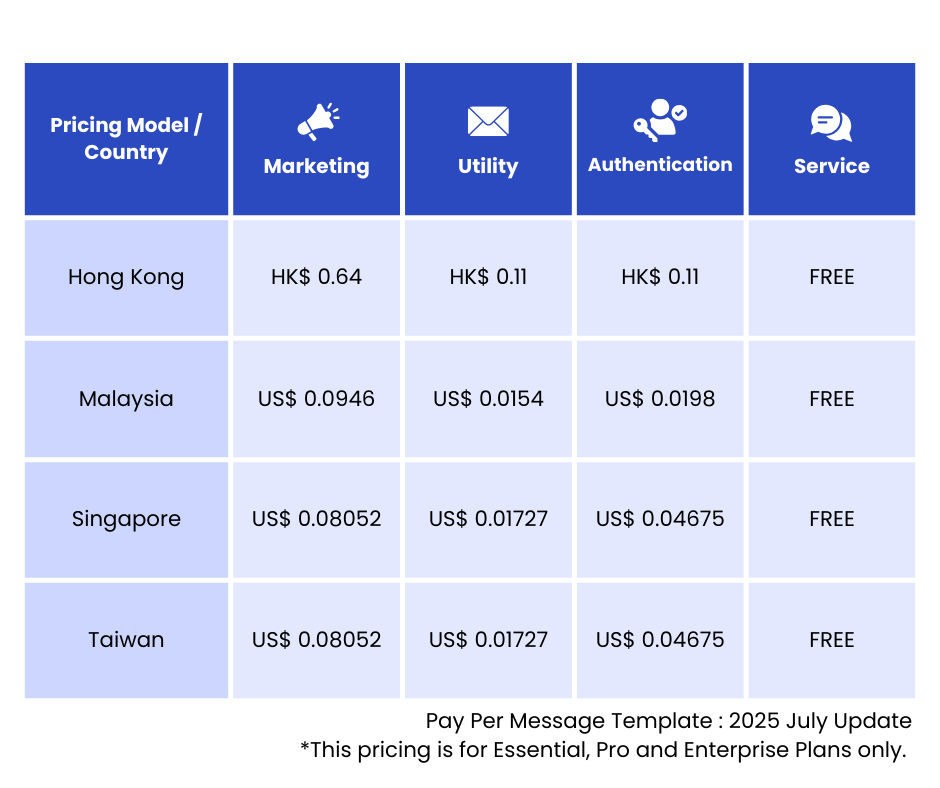
WhatsApp is **realigning prices by market** to match alternative channels.
📉 Utility pricing goes down in parts of Latin America & Rest of Regions
📈 Utility pricing goes up in Indonesia
📉 Authentication pricing drops in most countries — but *not* in Egypt, India, Malaysia, Nigeria, Pakistan, Saudi Arabia, South Africa, and the UAE.
👉 **Check the** [**rate card**](https://developers.facebook.com/docs/whatsapp/pricing/updates-to-pricing#rate-cards) to see how your markets are affected.
***
### 5. New Volume Tiers = Lower Rates at Scale
Send more, pay less.
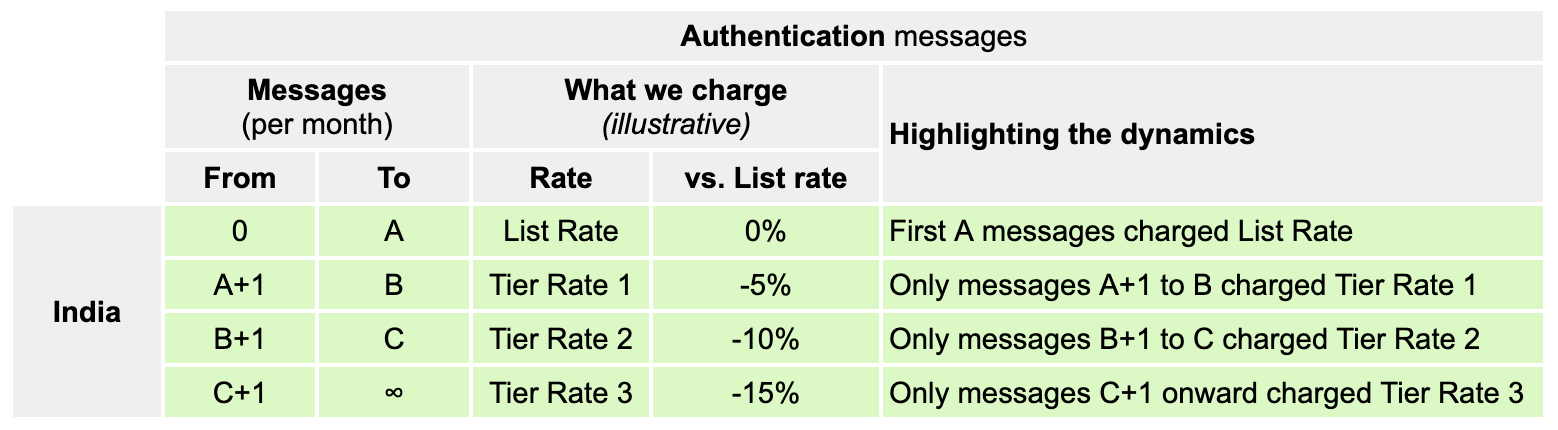
If your business sends **high volumes of utility or authentication messages**, you’ll **unlock better rates** as you hit higher tiers — based on **message count per category and region**.
📅 Tiers reset every month.
✅ **Why this matters:** It rewards businesses that are scaling fast — and allows better long-term cost control.
Credit: Meta Pricing Updates
> **WhatsApp Update Document** [**here**](https://developers.facebook.com/docs/whatsapp/pricing/updates-to-pricing?content_id=LVnKlKBXhBq7Ci0)**.**
***
### Messaging Strategy
Since Nov 1, 2024, all **service conversations** (also known as **User-Initiated Conversations**) are free when you are onboarded with the [iSlash AI](https://islash.io/whatsapp-message-pricing) WhatsApp API.
Meta’s clear signal is this:
> 💬 **Get customers to message you first.**
Here’s a simple breakdown of **which messages are free** and **which are charged**:
#### ✅ Free Messages:
* Manual replies within the 24-hour CSW
* Chatbot responses within the CSW
* Utility messages sent during the CSW
* Messages sent during a **72-hour Free Entry Point Window**
#### 💸 Paid Messages:
* Marketing messages templates
* Utility templates sent **outside** the 24-hour CSW
* Authentication messages templates
***
## Best Practices to Reduce WhatsApp API Message Costs
### 1. Encourage User-Initiated Conversations
Every time a customer sends the first message, you open a free window. Here's how to make that happen:
* Add a [**WhatsApp widget**](https://islash.io/user-guide/web-plugin-chat) to your site
* Use [**WhatsApp links**](https://wa.me/85239983678?text=WhatsappLinkGenerator) on social media
* Run [**Click-to-WhatsApp ads (CTWA)**](https://learn.islash.io/partners-corner/2025q1v5-click-to-whatsapp-ads-the-smartest-way-to-connect-with-customers)
> **CTWA Bonus:** Respond within 24 hours, and you get a [**72-hour window**](https://islash.io/whatsapp-message-pricing) (extra 48 hours) to send **free-form and utility messages.**
### 2. Use Automated Replies
When a customer messages you first, a 24-hour customer service window opens — and that’s your chance to engage **without incurring additional costs**.
With [iSlash AI’s no-code chatbot](https://islash.io/user-guide/no-code-chatbot-basics), you can set up **automated replies** that greet and guide customers, even outside business hours. This keeps the conversation active, improves response time, and avoids unnecessary message charges.
> Faster replies, better experience — and a simple way to **scale your customer support and engagement — affordably and efficiently.**
### 3. Design Purpose-Driven Message Templates
Whether it’s marketing, utility, or authentication — every message should have a [**clear goal**](https://learn.islash.io/whatsapp-messaging-strategy/boost-communication-whatsapp-message-templates-made-easy-2025-updates)**.**
When your message prompts the user to respond, the 24-hour customer service window reopens — and **you can send messages** and **utility message templates** for **FREE**!
With **iSlash AI**, you can also enable [**RCS (Rich Communication Services)**](https://learn.islash.io/islash-insights-2025/how-rich-communication-services-creates-meaningful-conversations-with-customer-globally#how-islash-ai-takes-rcs-to-the-next-level) in your message templates — adding buttons, images, and quick replies to make your messages more interactive and **encourage customer engagement**.
***
## How to Measure and Maximize WhatsApp ROI
Using the WhatsApp API is an investment — but how do you know if it’s really paying off?
Here’s a simple way to measure your **Return on Investment (ROI)**: Compare how much you’re **spending on messages** vs how much **revenue you’re generating** through customer interactions on WhatsApp.
Follow these 4 steps to evaluate and improve your ROI:
### 1. Monitor Your Messaging Spend
Keep an eye on what types of messages you’re sending (marketing, utility, authentication.), how many, and to which regions. This helps you spot any rising costs — and where you might be overspending.
### 2. Set Clear KPIs
Define what success looks like for your team. This could be:
* Conversion rates (how many chats turn into sales)
* Response time
* Customer satisfaction scores
Tracking these will help you know if your WhatsApp messages are making an impact — or if something needs to improve.
### 3. Measure What You Earn vs. What You Spend
Tie your WhatsApp efforts to sales, repeat purchases, or lead quality — and assess ROI. If it’s working, **invest more strategically**.
Let’s say:
* Your WhatsApp-generated revenue this month = **$8,000**
* Your total cost (including WhatsApp API Message Fees + subscription) = **$2,588**
**ROI Formula =** (Net Revenue – Cost) ÷ Cost × 100%
That means for every $1 you spent, you are earning approximately $2.09.
### 4. Improve Your Messaging Strategy
Whether you're starting a new conversation, send a message outside the 24-hour window, or use WhatsApp Broadcast, businesses must use an approved message template. This will incur a charge, whether it’s a [marketing, utility, or authentication message](https://learn.islash.io/islash-insights-2025/business-messaging-templates-for-marketing-utility-and-authentication-best-practices-inside).
To stay efficient: rather than relying on more messages, **focus on better ones**.
* Prioritize **getting feedback from your customers**
* Learn what messages they find helpful
* Then improve what matters most to them
Keeping conversations relevant and responsive not only strengthens trust — it also **reduces the need for costly follow-ups** and keeps your messaging spend under control.
***
## Final Thoughts: Rethink Conversations, Not Just Costs
The winners in this new model will be businesses that stop chasing "cheaper messages" — and start chasing **smarter conversations**.
✅ Get customers to message you
✅ Respond fast
✅ Automate with intent
✅ Measure what matters
✅ And stay within the free windows whenever possible
> **Shift your thinking from “how much do messages cost?” to “how much value does each message create?”**
Whether you’re just getting started or scaling fast, iSlash AI makes sure you’re getting the most out of every message**.**
[**Upgrade for FREE**](https://islash.io/sme-plan) 👇
***