> For the complete documentation index, see [llms.txt](https://learn.islash.io/llms.txt). Markdown versions of documentation pages are available by appending `.md` to page URLs; this page is available as [Markdown](https://learn.islash.io/zh/features/conversion-engagement-tools/in-app-payment/payment-gateway.md).
# 支付網關
Payment Gateway
iSlash支援各種支付服務提供商,您唔需煩惱追蹤交易,系統會幫你透過可靠的閘道輕鬆收款,方便又快速。
### 如何使用 Stripe 收款?
首先,[註冊](https://dashboard.stripe.com/login?redirect=%2Fregister%2F)Stripe賬戶,按照網站的指引,進行身份驗證,及加入銀行資料。
到[Stripe API Docs](https://stripe.com/docs/api/)獲得API Keys,選擇添加密鑰 (Secret Key)。
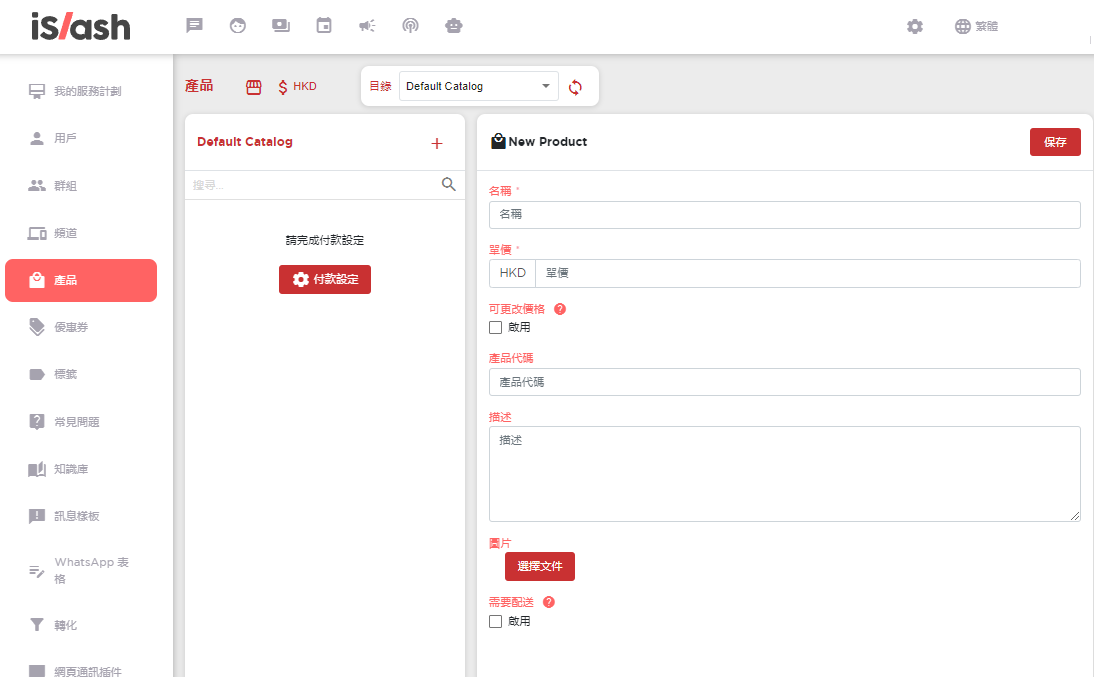
接下來,[登錄](https://app.islash.io/login?returnUrl=%2Fdashboard)您的iSlash賬戶,選擇左上角 「設定」 → 「產品」,建立您的產品(下圖)及完成付款設定。
 #### 付款設定
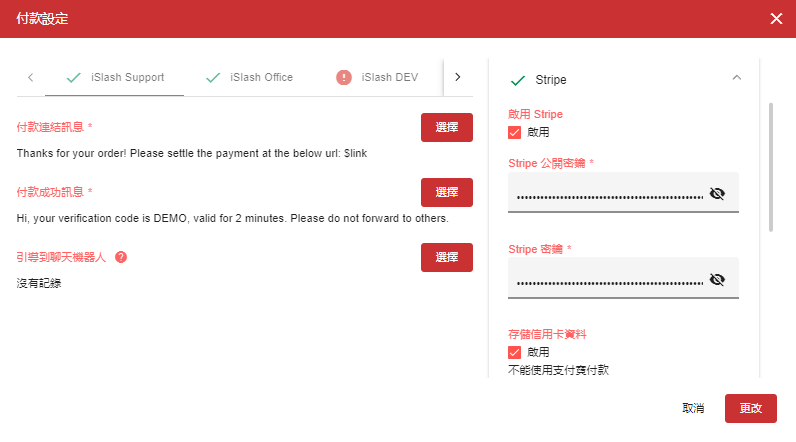
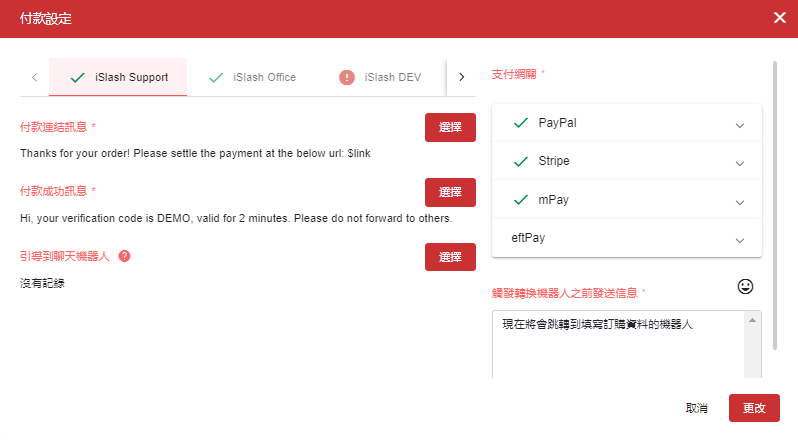
選擇 「付款設定」,支付網關 「Stripe」。啟用 Stripe,輸入Stripe 公開密鑰和Stripe密鑰,勾選儲存信用卡資料。
自定義輸入 「付款鏈接訊息」 和 「付款成功訊息」。\
***付款URL**:$link*
現在您可以開始使用Stripe收款。:heart\_eyes:
#### 付款設定
選擇 「付款設定」,支付網關 「Stripe」。啟用 Stripe,輸入Stripe 公開密鑰和Stripe密鑰,勾選儲存信用卡資料。
自定義輸入 「付款鏈接訊息」 和 「付款成功訊息」。\
***付款URL**:$link*
現在您可以開始使用Stripe收款。:heart\_eyes:
 ### 如何使用Paypal收款?
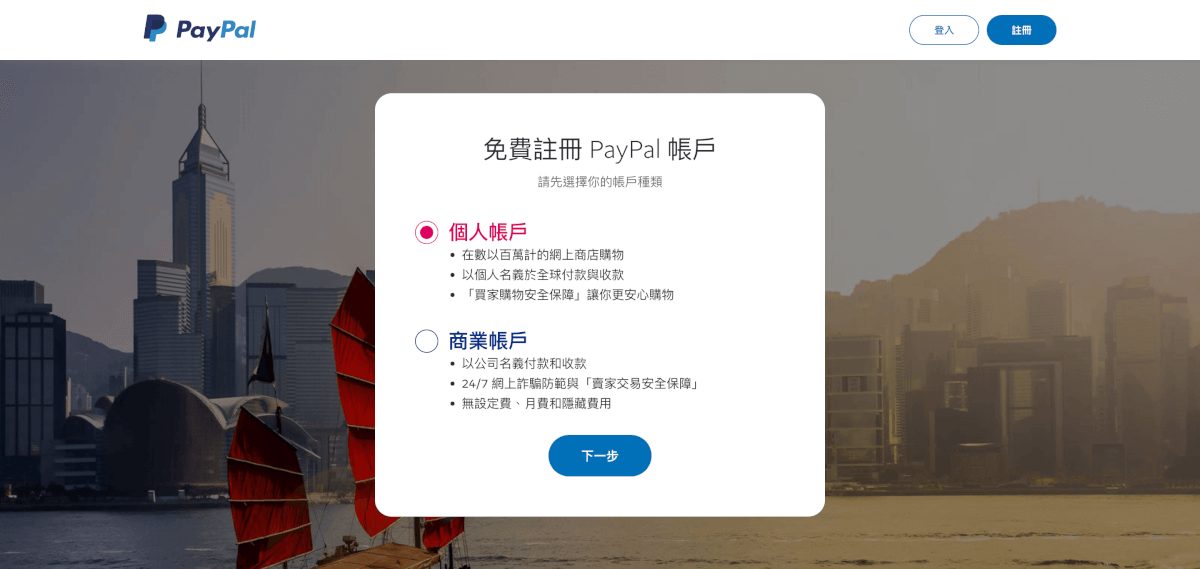
點擊[註冊](https://www.paypal.com/signin?country.x=HK\&locale.x=zh_HK\&langTgl=zh)賬戶,選擇您的賬戶種類([商業賬戶](#paypal-shang-ye-zhang-hu)/個人賬戶)。
### 如何使用Paypal收款?
點擊[註冊](https://www.paypal.com/signin?country.x=HK\&locale.x=zh_HK\&langTgl=zh)賬戶,選擇您的賬戶種類([商業賬戶](#paypal-shang-ye-zhang-hu)/個人賬戶)。
 下一步,建立您的登入資料,包括居住地方,手機號碼,個人資料,如身份證號碼、出生日期、地址及聯絡資料。
鏈接您的信用卡並選擇賬單地址,點擊 「儲存」。
成功建立帳戶後,PayPal會向你發送確認電郵。開啟登記電子郵件後點擊 「確認電郵地址」。
#### PayPal 商業賬戶
如果您是選擇 PayPal 商業賬戶,[請務必要看這篇](https://www.soldeazy.com/support/article.php?id=897#001)
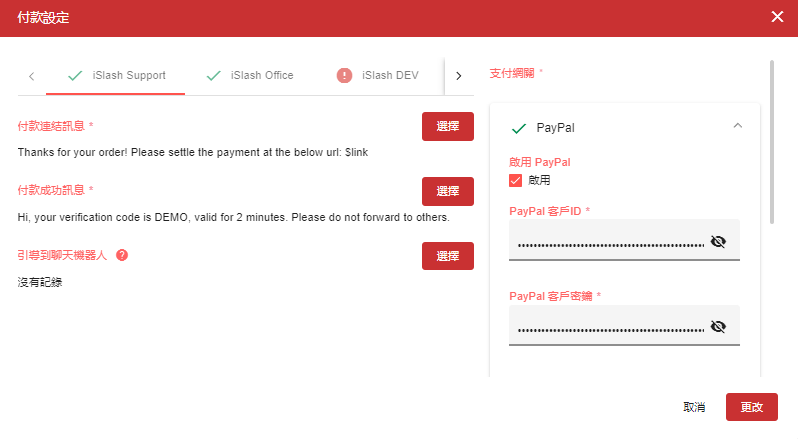
註冊賬戶後,您可以回到iSlash選擇 「付款設定」,支付網關 「PayPal」。啟用,輸入PayPal客戶ID以及客戶密鑰。
完成! :tada:
下一步,建立您的登入資料,包括居住地方,手機號碼,個人資料,如身份證號碼、出生日期、地址及聯絡資料。
鏈接您的信用卡並選擇賬單地址,點擊 「儲存」。
成功建立帳戶後,PayPal會向你發送確認電郵。開啟登記電子郵件後點擊 「確認電郵地址」。
#### PayPal 商業賬戶
如果您是選擇 PayPal 商業賬戶,[請務必要看這篇](https://www.soldeazy.com/support/article.php?id=897#001)
註冊賬戶後,您可以回到iSlash選擇 「付款設定」,支付網關 「PayPal」。啟用,輸入PayPal客戶ID以及客戶密鑰。
完成! :tada:
 ### mPay & eftPay
mPay 和 eftPay 支援大部分香港本地支付方式,包括轉數快 (FPS)、八達通、PayMe、支付寶、微信支付等。
訪問 [mPay](https://www.mpay.com.hk/) 或 [eftPay](https://www.eftpay.com.hk/zh/%E4%B8%BB%E9%A0%81/) 網站創建您的賬戶。
### mPay & eftPay
mPay 和 eftPay 支援大部分香港本地支付方式,包括轉數快 (FPS)、八達通、PayMe、支付寶、微信支付等。
訪問 [mPay](https://www.mpay.com.hk/) 或 [eftPay](https://www.eftpay.com.hk/zh/%E4%B8%BB%E9%A0%81/) 網站創建您的賬戶。
 ## 發送付款鏈接
依家您也可以直接發送付款鏈接給您的客戶,讓交易變得前所未有的順暢。
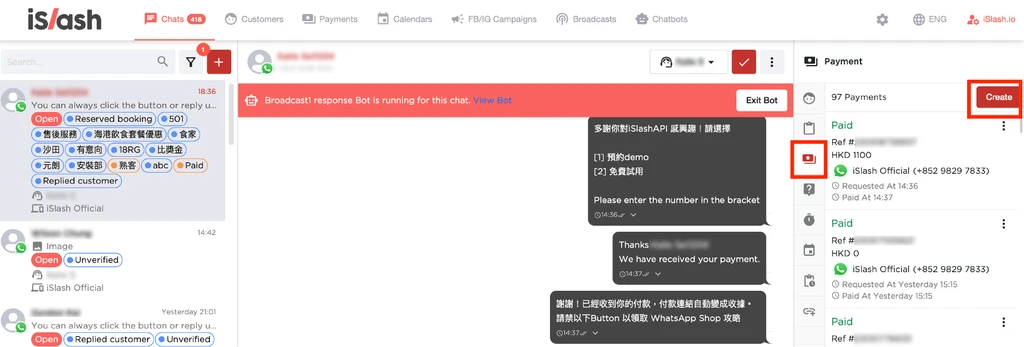
1. 前往iSlash聊天室,選擇您的客戶,點擊右邊 「付款」 圖標,點擊 「建立」。
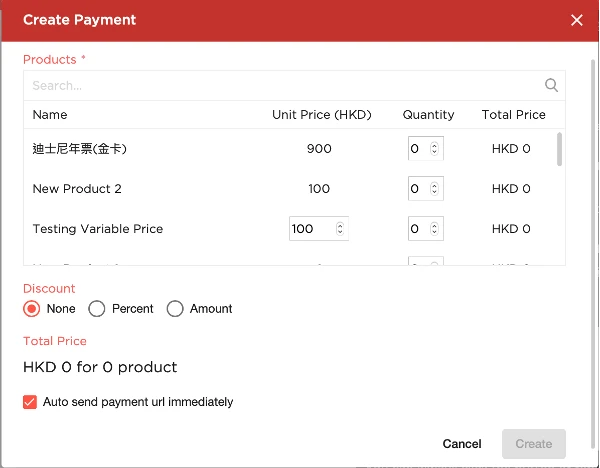
2. 輸入單價和數量。
3. 當按下 「建立」 後,iSlash 會將您的訊息連同付款鏈接一同發送給客戶。
## 發送付款鏈接
依家您也可以直接發送付款鏈接給您的客戶,讓交易變得前所未有的順暢。
1. 前往iSlash聊天室,選擇您的客戶,點擊右邊 「付款」 圖標,點擊 「建立」。
2. 輸入單價和數量。
3. 當按下 「建立」 後,iSlash 會將您的訊息連同付款鏈接一同發送給客戶。
 付款鏈接發送給客戶後,該客戶將自動附加一個 ***「待支付」*** 標籤。直到客戶完成支付,標籤將更新為 ***「已支付」***。
## 付款記錄
您可以在iSlash的 “付款記錄” 輕鬆追蹤客戶的支付清單。無論是要核對支付,或是分析銷售成績,這功能讓您隨時掌握最新情況。
付款鏈接發送給客戶後,該客戶將自動附加一個 ***「待支付」*** 標籤。直到客戶完成支付,標籤將更新為 ***「已支付」***。
## 付款記錄
您可以在iSlash的 “付款記錄” 輕鬆追蹤客戶的支付清單。無論是要核對支付,或是分析銷售成績,這功能讓您隨時掌握最新情況。
